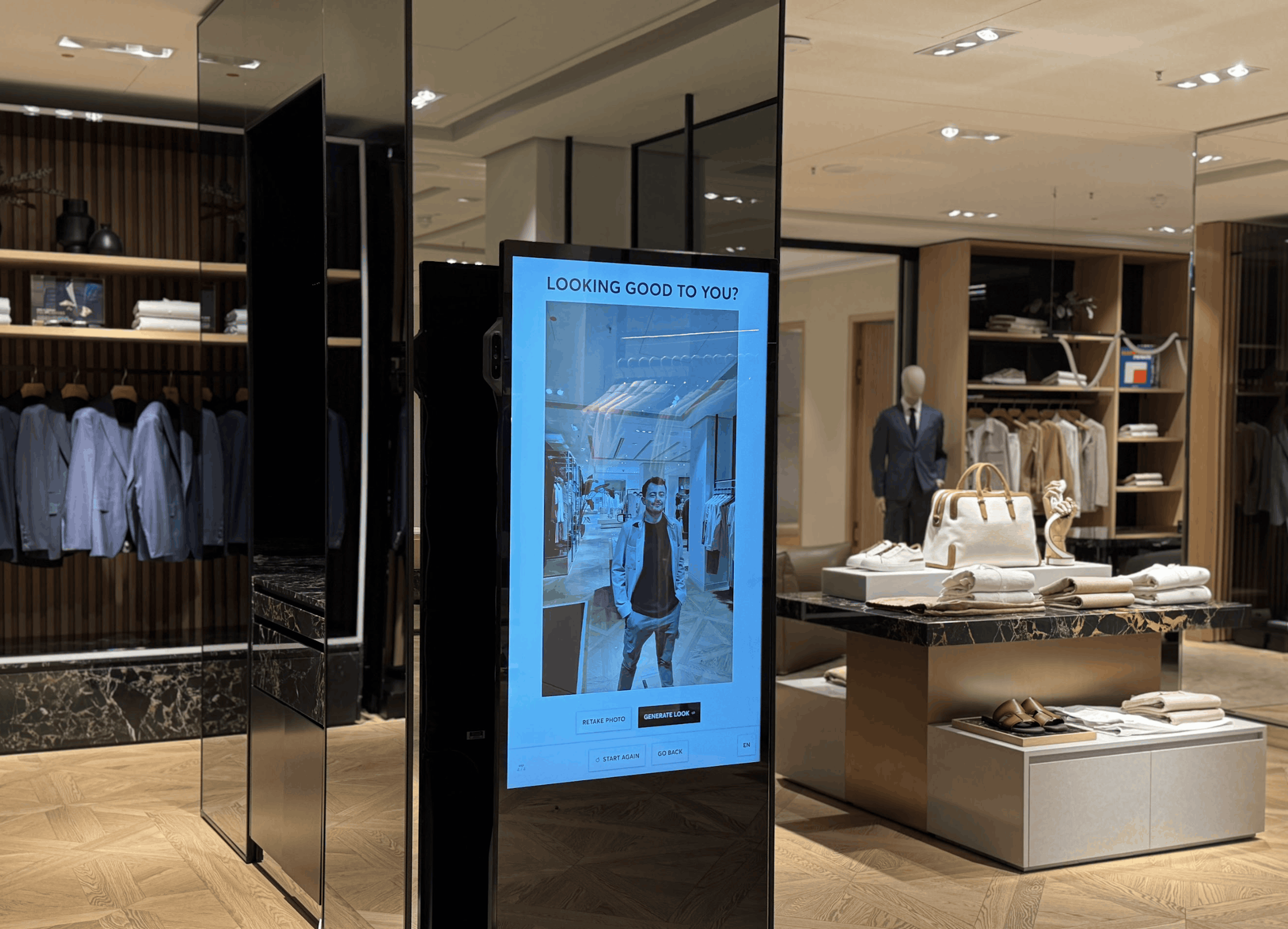
An interactive kiosk is usually pictured as a touchscreen on a stand, yet in retail the hardware is the least interesting part of it. What matters is what happens after a shopper touches the screen, whether that is a tailored product suggestion, a game that keeps a group of friends in the aisle for a few more minutes, or an email address handed over in exchange for something worth having.
This guide explains what an interactive kiosk is, how it differs from a screen that only plays content, and what interactive kiosks can do inside a retail campaign, using a Hugo Boss rollout across four flagship stores as the worked example.
What is an interactive kiosk in retail?
In a retail setting, an interactive kiosk is a screen, usually touch-enabled and often paired with a camera, that responds to the shopper rather than simply playing at them. The shopper makes a choice, answers a question, plays a game or scans a code, and the experience changes in response. Interactive kiosks can sit on the shop floor, in a window or at a pop-up, and they are normally run as part of a campaign with a start date, a goal and something to measure, rather than installed once and left alone.
An interactive retail kiosk therefore has three parts. The first is the physical device, which might be a floor-standing unit, a wall-mounted screen or a tablet on a counter. The second is the experience the shopper sees, such as a product finder, a quiz or a photo booth. The third is the software behind it, which controls what content runs, where and when, keeps the devices online and records what shoppers do.
Interactive kiosk software is the part that decides whether a kiosk stays useful after launch week, because it is what lets a team change a campaign across many stores without sending someone to each one. Merlin Cloud's interactive kiosks are built around that software layer.
How an interactive kiosk differs from digital signage
A digital signage screen shows content to people who happen to walk past, and its success is usually measured in impressions. An interactive kiosk asks something of the shopper and gives something back, so it can be measured in interactions, answers, entries and the leads or enquiries that follow. The two are often confused because they can share hardware, but the difference lies in what the shopper is invited to do.
Our earlier post on the difference between digital signage and interactive kiosk campaigns goes through that comparison in more detail, so this guide concentrates on what an interactive kiosk can do on its own terms.
What an interactive retail kiosk can do inside a campaign
Most retail campaigns use an interactive kiosk for one of a handful of jobs, and the same device can switch between them as the campaign changes.
Experience | What the shopper does | What the retailer can learn or capture |
|---|
Product discovery | Answers a few questions or tries a look and is shown matching products | Which products and styles people are drawn to |
Games and competitions | Plays a short challenge, often with a prize or reward | Participation, repeat play and entry details when shoppers opt in |
Quizzes and brand challenges | Answers questions that lead to a personalised result | Preferences and opt-in contact details |
Photo booth | Takes and shares a branded photo | Social reach and sign-ups |
Information kiosk | Looks up store, product or event information | The questions shoppers ask most often |
Because an interactive kiosk is a campaign tool rather than a fixed installation, a product finder can run in one month and a competition in the next, which is one reason retailers use them for seasonal launches and in-store promotions.
Scheduling and rolling out those campaigns across locations is handled through campaign management. The same kiosks also work away from the shop floor, and our guide to interactive exhibition stand ideas covers how they are used at expos and trade shows.
A Hugo Boss example of an interactive kiosk for product discovery
In spring 2026, Hugo Boss used an interactive kiosk to make styling instant in four flagship stores. Shoppers could try on more than 40 outfits through an AI-powered virtual styling experience, and the campaign also featured AI-generated fashion videos set around a Mediterranean wedding. A mobile version extended the experience beyond the flagship stores, so that people elsewhere in Europe could take part as well.
The case study reports 1,922 social shares in 60 days and a 270% increase in outfit enquiries. Both figures point to something a passive screen cannot do, since they come from shoppers choosing to take part and then choosing to share or ask for more. The full write-up is on the Hugo Boss case study.
What to look for in interactive kiosk software
Interactive kiosk software tends to be judged less on launch day than on the hundredth day, so a few questions are worth asking before choosing a platform.
Can campaigns be changed and scheduled across every store from one place?
Can devices be locked down, monitored and updated remotely?
Does the platform record what shoppers do, so results can be compared between campaigns and locations?
Does it cover the experience types you plan to run, from product discovery to games, or will each one need a separate build?
These questions matter more as the number of devices grows, because small gaps that are easy to manage in one store become expensive to manage in fifty. If you are weighing up an interactive kiosk for a launch or a roll-out, the team at Merlin Cloud is happy to talk through what that could look like for your stores. Most deployments start from a Merlin Cloud template, tailored to your brand, so the conversation usually begins with the goal and the locations rather than with a blank page. Get in touch to start that conversation.
Related reading
Read more about interactive kiosks, see how campaign management handles rollout across stores, or browse the Hugo Boss case study.