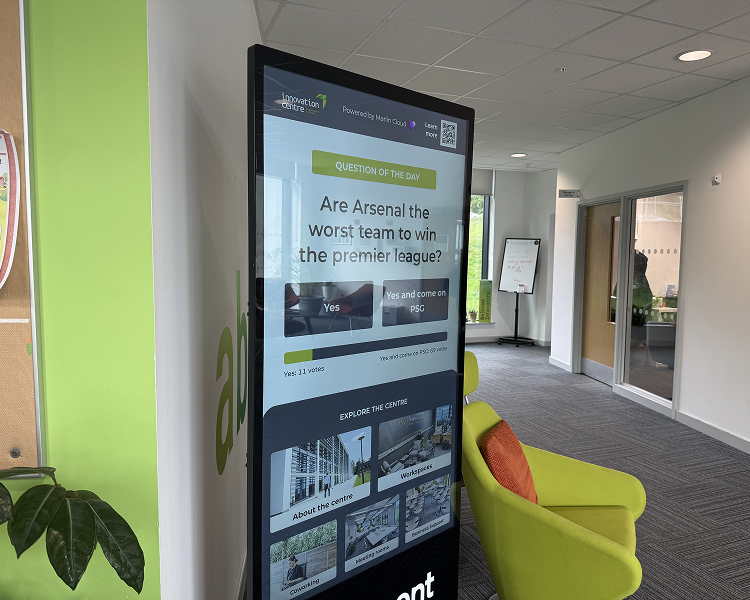
Every busy building has a person who spends part of the day answering the same questions. Where is the meeting room, which floor is that office on, who do I sign in with, what time does the centre close.
Digital wayfinding puts those answers on a screen at the entrance, so visitors can find their own way and your team can spend its time on the people who actually need a person.
This guide explains what digital wayfinding is, what a good wayfinding system includes, and how one workspace operator used a self-service kiosk in 19 business centres to cut reception enquiries about directions.
What is wayfinding, and what makes it digital?
Wayfinding is the way people find their way through a space, and it covers everything from floor numbers and directional signs to the person at reception who points you down the corridor.
Digital wayfinding does the same job with a screen, usually a touchscreen, that shows directions, floor plans and building information on demand. Visitors choose where they want to go and the kiosk shows them, instead of relying on a sign that can only say one thing to everyone.
Some organisations use digital signage wayfinding, where screens display fixed maps or directories on a loop. An interactive version goes a step further by responding to what the visitor needs, so someone looking for a particular meeting room gets directions to that room rather than a general map. If you are weighing the two approaches, our guide to the difference between digital signage and interactive kiosk campaigns explains where each one fits.
Why reception teams end up as the wayfinding system
In many buildings, reception is the wayfinding system by default. Tenants, visitors, couriers and meeting guests all arrive with the same few questions, and the member of staff at the desk answers them one at a time. That is manageable when the building is quiet, but it ties up the desk whenever several people arrive at once.
The cost is not only time. Every direction question is a moment when the receptionist is not helping someone with a more complex need. Printed signage cannot show today's events or this week's opening hours without being reprinted.
What a digital wayfinding kiosk includes
A wayfinding kiosk is a wall-mounted or freestanding touchscreen placed where visitors first need direction. The setup behind it matters as much as the screen, and a few features do most of the work.
Interactive floor plans
An interactive floor plan lets visitors browse the building and follow a route to the floor, office or room they need. It replaces the general map on the wall with directions that match the question being asked. Merlin Cloud's information kiosk includes wayfinding maps of this kind.
Visitor check-in
The same screen can log who is on site, so check-in no longer depends on a staffed desk. For a business centre, that means visitors can check in and get directions in one step.
Content that updates centrally
Opening times, events and frequently asked questions can be edited in one place and updated on screen, with no reprinting of signage. This is the difference between a kiosk and a noticeboard, and it is what keeps the information worth trusting.
The same experience across sites
For an organisation with several buildings, the same kiosk experience can be deployed in each one and adapted to its own layout and branding.
Our guide to what kiosk device management involves covers how many screens are kept running and up to date.
A real example from Oxford Innovation
Oxford Innovation runs business centres where tenants, visitors, couriers and meeting guests need to find their way around every day. Reception teams were spending a significant part of their day answering the same wayfinding questions, which took their attention away from tenants and more complex visitor needs.
A self-service kiosk gave every visitor a simple way to check in, get directions and find the information they needed, without waiting for a member of staff. It has been deployed in 19 business centres and logs 470 visitor check-ins a month. The case study reports a 90% reduction in reception enquiries about wayfinding and directions.
Two of the lessons from the project are worth taking into any building. Keeping the directory and information genuinely current, rather than treating the kiosk as a static noticeboard, is what made visitors trust it enough to use it instead of asking at reception. And rolling the same core experience out across centres, adapted to each building's layout and branding, made it feel native to each one. The full write-up is in the Oxford Innovation case study.
Where digital wayfinding fits
Digital wayfinding suits any high-traffic environment where visitors arrive without knowing the layout. Visitor centres can give first-time guests a confident way to find their way around. Corporate campuses and offices can cut the reception time spent on directions, which is the usual aim of office wayfinding. Event venues can keep schedules and hall maps current without reprinting signage.
How to plan a digital wayfinding system
Start with the questions your team answers most often, since those decide what the kiosk needs to show. List the destinations visitors ask about, gather accurate floor plans and decide where the first screen should go, which is usually where visitors first need direction after they come through the door.
Then decide who owns the content. A kiosk is only as useful as its information, so someone needs to be responsible for opening times, tenant directories and event listings, and the platform should let them make changes without a developer. If you plan to run several sites, check that the same setup can be rolled out and managed from one place.
Finally, think about the data. A check-in feature records who is on site, which is personal data, so visitors should be told plainly how it will be used and how long it is kept. The ICO's UK GDPR guidance and resources is the place to start.
How Merlin Cloud supports digital wayfinding
Merlin Cloud builds interactive kiosk experiences, including an information kiosk with wayfinding maps, visitor check-in, centrally editable content and a consistent set-up across locations.
Most deployments start from a Merlin Cloud template tailored to your brand and your building, so a conversation usually begins with the questions your visitors ask and the sites you manage rather than a blank page. If you would like to talk through what that could look like for your centres, get in touch.
Related reading
Read more about interactive kiosks, see how our information kiosk works, or find out what an interactive kiosk is and what it can do in a retail campaign.